
Someone recently asked me how to turn off email notifications of new topics or posts. Apparently that may have changed recently where the default now is to receive emails for every new topic and post. I haven't changed any settings myself but the forum application gets updates every couple of weeks so something may have changed with the new versions.
If you are making a post, notice at the bottom of the post there is a checkbox that says "Subscribe to this post." (or reply) You can uncheck that if you don't want any more emails about that.
If you find you are getting emails for every new post you can find that setting in your forum profile.
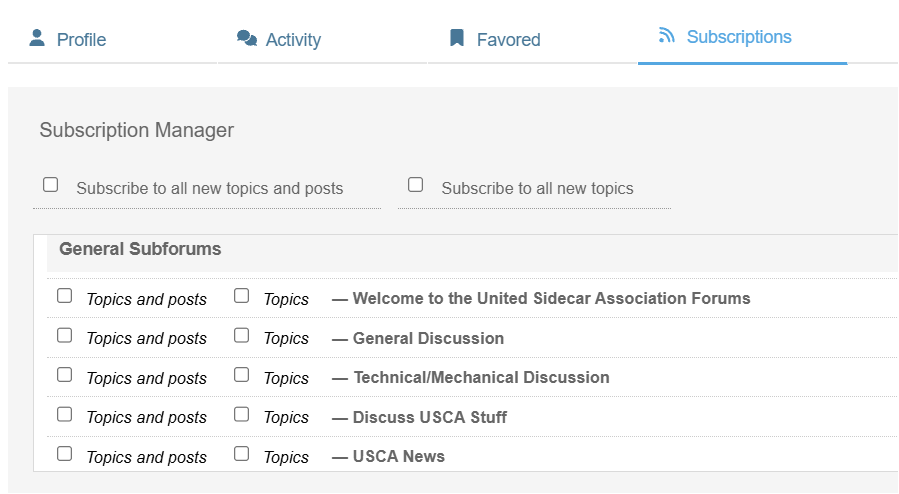
(click to view larger)
Uncheck those boxes and that will turn off email notifications for you.
I think the default to have email notifications is not bad for most people who are new members here or infrequent visitors. They may need notices when certain posts have replies. But for members who post here frequently that is probably not necessary so unchecking those boxes in your profile will turn them off.
But as I am clicking around I see that I can't easily find my forum profile! If you click on your name in the upper right corner that will take you to the membership profile which is different. The only way I can find to see and edit my forum profile is to find a post I made and click on my username on the left of the post. That will open the profile and then you can click on the 'subscriptions' tab and check/uncheck the boxes.
Jerry
I fly (and ride) to free my mind from the tyranny of petty things. Antoine de Saint-Exupéry